Good news, I’ve found a solution to the problem with the DGS-1210-24P Rev D1 and I am now polling both of these switches with SNMP for the last several days successfully.
I was trying to get them working again recently and realised that it was the 6 hourly discovery scan (which finds port names, device model etc) which was crashing the SNMP service on the switch, but the 5 minute poller scan was not crashing it.
Hence it would work for a few hours until the next scheduled discovery scan occurred. Since I first started this thread I’ve learnt about the “Capture” feature in the GUI - somehow I never noticed this feature until quite recently and it is extremely useful and helped me nail down the cause and solution quite quickly.
Once I realised it was the discovery scan causing the issue I manually ran a discovery scan by going to the device page, click on the 3 dot button on the far right then go to capture.
Then I left it on the default of Discovery and pressed run - this immediately runs a discovery scan showing the result in the window below which you can copy and paste.
Every time I would run discovery manually the SNMP service on the switch would hang until after a reboot. Looking at the debug log capture I could see the last scan run before the SNMP hang was the IPv6 one.
I’m not interested in IPv6 data from the switch (I’m not even sure if this switch supports it to be honest) so I simply disabled IPv6 in the discovery module for this specific device.
To do this go into the device page, click the settings icon then go to Modules. Down the right hand side in the discovery modules list set IPv6 to disabled:
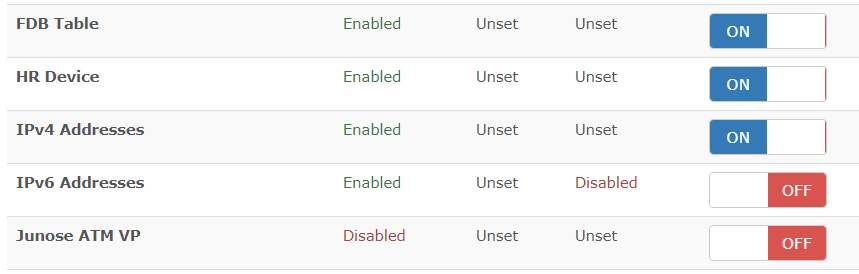
After this it will no longer be polled for the specific data that is causing the hang. If the SNMP service is already hung you’ll need to reboot the switch and after that you should find you can manually perform a Discovery scan in the Capture Debug page without the SNMP service hanging and that polling now works normally.
I’m still running the unreleased 4.22.B007 firmware (for Rev D1 hardware) which I was provided by D-Link support, I don’t know if disabling IPv6 is sufficient for the last public firmware release, if you try this workaround let us know. If you still see SNMP hanging after a few hours/days, contact D-Link support to get this firmware version in addition to disabling IPv6 polling.
I also recommend disabling Safeguard engine on this model of switch. In my experience if it is enabled and you poll the switch for the IPv6 SNMP data not only does the SNMP service hang, the Web/telnet interface hangs as well, making it impossible to remotely reboot the switch. (It still keeps switching traffic however) But with Safeguard engine disabled if you do cause the SNMP service to crash during your testing it does not affect other features like the web interface so a remote reboot is still possible.
Good luck and let us know if a similar fix works for you, assuming your switches are also Rev D1.
The issue here is clearly a bug in the SNMP implementation in the switch as when it receives a certain request it hangs forever, however no more firmware versions are forthcoming from D-Link (I checked again with support) and due to the age of the switch I think this bug will likely never be fixed, however disabling the IPv6 scan seems like a reasonable workaround especially when you can do it per device.