Hi, Support.
I have setup LibreNMS following the install guide using nginx as the web server which works fine. I can access this internally on its private IP.
I have a requirement to setup external access to the server using HTTPS which i need assistance with please. I have purchased a certificate and have the .pem file and the private key file. Created a new directory in /etc/nginx/ssl, sorted permissions and put both the certificate files here. I have edited the /etc/nginx/conf.d/librenms.conf file to contain the following information and restarted nginx but i still can’t access it on HTTPS.
server {
listen 443 ssl http2;
listen [::]:443 ssl http2;
ssl_certificate /etc/nginx/ssl/omitted-for-security.pem;
ssl_certificate_key /etc/nginx/ssl/omitted-for-security.key;
server_name omitted-for-security.co.uk;
access_log /var/log/nginx/nginx.vhost.access.log;
error_log /var/log/nginx/nginx.vhost.error.log;
root /opt/librenms/html;
index index.php;
}
I have setup DNAT on my firewall so its accessible via port 443 etc and configured global DNS to point to one of our public IPs.
Can anyone shed some light on where I’m going wrong? I suspect the cert is not installed or librenms.conf config is wrong but please advise.
If you need any information please ask and I can provide.
Thanks in advanced,
James
Well, it’s not really clear what you’re seeing when you try to access it over HTTPS. Does it connect at all? Throw cert errors? Display something but not the LibreNMS app?
It looks like you’re server{} block is missing the PHP/PHP-FPM config though. Should be pretty close the http example in the install docs.
Hi, Slashdoom.
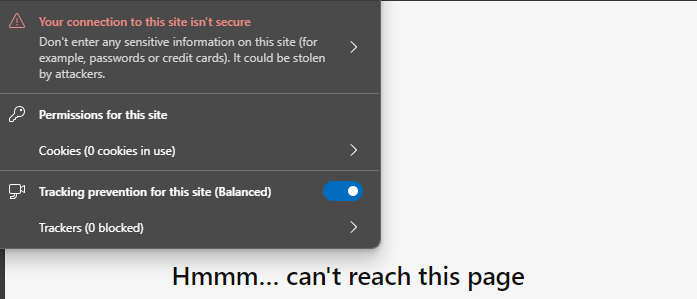
Sorry should have added this in my original post. When i try to access the site on port 443, it just shows the following:
This would indicate that the certificate is not working.
Thanks,
James
Also I changed the librenms.conf file like you suggested so it now looks likes this
server {
listen 80;
server_name omitted-for-security.co.uk;
root /opt/librenms/html;
index index.php;
listen 443 ssl http2;
ssl_certificate /etc/nginx/ssl/omitted-for-security.pem;
ssl_certificate_key /etc/nginx/ssl/omitted-for-security.key;
access_log /var/log/nginx/nginx.vhost.access.log;
error_log /var/log/nginx/nginx.vhost.error.log;
charset utf-8;
gzip on;
gzip_types text/css application/javascript text/javascript application/x-javascript image/svg+xml text/plain text/xsd text/xsl text/xml image/x-icon;
location / {
try_files $uri $uri/ /index.php?$query_string;
}
location ~ [^/].php(/|$) {
fastcgi_pass unix:/run/php-fpm-librenms.sock;
fastcgi_split_path_info ^(.+.php)(/.+)$;
include fastcgi.conf;
}
location ~ /.(?!well-known).* {
deny all;
}
}
However this still shows not certificate warning when i try to browse to it on port 443 and then it doesn’t load as per the image above.
Any more ideas?
Thank you,
James
If you can, I would try to use the curl command on your client device to see what’s really going on. Try it against both http and https and see what the output is. The browser output just isn’t that clear, to me at least. Curl should let you see if it actually connects, what if any cert if presented, resolution, etc.
curl -v http://omitted-for-security.co.uk/
curl -kv https://omitted-for-security.co.uk/
Hi, Slashdoom.
Apologies for the delay, I ran those commands and it comes back with the following
netadmin@localhost:/etc/ssl/certs$ curl -kv https://omitted-for-security.co.uk/
- Trying 1.2.3.4:443…
- Connected to omitted-for-security.co.uk (1.2.3.4) port 443 (#0)
- ALPN, offering h2
- ALPN, offering http/1.1
- TLSv1.0 (OUT), TLS header, Certificate Status (22):
- TLSv1.3 (OUT), TLS handshake, Client hello (1):
- TLSv1.2 (IN), TLS header, Certificate Status (22):
- TLSv1.3 (IN), TLS handshake, Server hello (2):
- TLSv1.2 (OUT), TLS header, Unknown (21):
- TLSv1.2 (OUT), TLS alert, handshake failure (552):
- error:0A000152:SSL routines::unsafe legacy renegotiation disabled
- Closing connection 0
curl: (35) error:0A000152:SSL routines::unsafe legacy renegotiation disabled
Seems like the handshake is failing. Any ideas how to move this forward?
Thank you,
James
Yeah, that’s tricky. Getting outside of my area of expertise here, but my understanding of that message is that it’s saying the server doesn’t support RFC5746 (secure renegotiation) so it tried to do insecure renegotiation (which OpenSSL 3+ doesn’t allow). That could be the case if your webserver is an old version. But it’s also possible that something in the middle is interfering and doesn’t allow renegotiation. Like a corporate proxy, firewall with SSL/TLS inspection, client-side firewall, VPN client, etc.
Do you get the same result on both outside of the DNAT firewall you mentioned and when connection to the webserver directly?
Hmm ok so interestingly I read up that this error is common on Ubuntu 22.04.
I changed the openssl.cnf file and added Options = UnsafeLegacyRenegotiation
within the [system_default_sect] section and now it doesn’t show this error, but a different one.
It also shows the certificate from the firewall and not the server?
netadmin@bell-librenms01:~$ curl -kv https://omitted-for-security.co.uk/
- Trying 1.2.3.4:443…
- Connected to omitted-for-security.co.uk (1.2.3.4) port 443 (#0)
- ALPN, offering h2
- ALPN, offering http/1.1
- TLSv1.0 (OUT), TLS header, Certificate Status (22):
- TLSv1.3 (OUT), TLS handshake, Client hello (1):
- TLSv1.2 (IN), TLS header, Certificate Status (22):
- TLSv1.3 (IN), TLS handshake, Server hello (2):
- TLSv1.2 (IN), TLS header, Certificate Status (22):
- TLSv1.2 (IN), TLS handshake, Certificate (11):
- TLSv1.2 (IN), TLS header, Certificate Status (22):
- TLSv1.2 (IN), TLS handshake, Server key exchange (12):
- TLSv1.2 (IN), TLS header, Certificate Status (22):
- TLSv1.2 (IN), TLS handshake, Server finished (14):
- TLSv1.2 (OUT), TLS header, Certificate Status (22):
- TLSv1.2 (OUT), TLS handshake, Client key exchange (16):
- TLSv1.2 (OUT), TLS header, Finished (20):
- TLSv1.2 (OUT), TLS change cipher, Change cipher spec (1):
- TLSv1.2 (OUT), TLS header, Certificate Status (22):
- TLSv1.2 (OUT), TLS handshake, Finished (20):
- TLSv1.2 (IN), TLS header, Finished (20):
- TLSv1.2 (IN), TLS header, Certificate Status (22):
- TLSv1.2 (IN), TLS handshake, Finished (20):
- SSL connection using TLSv1.2 / ECDHE-RSA-AES128-SHA256
- ALPN, server did not agree to a protocol
- Server certificate:
- subject: C=TW; ST=HsinChu; L=HuKou; O=DrayTek Corp.; OU=DrayTek Support; CN=Vigor Router
- start date: Oct 5 05:08:50 2023 GMT
- expire date: Nov 3 05:08:50 2024 GMT
- issuer: C=TW; ST=HsinChu; L=HuKou; O=DrayTek Corp.; OU=DrayTek Support; CN=Vigor Router
- SSL certificate verify result: self-signed certificate (18), continuing anyway.
- TLSv1.2 (OUT), TLS header, Supplemental data (23):
GET / HTTP/1.1
Host: omitted-for-security.co.uk
User-Agent: curl/7.81.0
Accept: /
- TLSv1.2 (OUT), TLS header, Unknown (21):
- TLSv1.2 (OUT), TLS alert, decode error (562):
- OpenSSL SSL_read: error:0A000126:SSL routines::unexpected eof while reading, errno 0
- Closing connection 0
curl: (56) OpenSSL SSL_read: error:0A000126:SSL routines::unexpected eof while reading, errno 0
Maybe this?
https://www.draytek.com/support/knowledge-base/5214#:~:text=Change%20the%20port%20for%20HTTPS,then%20click%20OK%20to%20apply.
Vigor Router provides NAT settings, such as Port Redirection and Open Ports, to redirect connection requests on the WAN to an internal server on the LAN. However, when it comes to HTTPS requests, which uses TCP port 443, we need not only the NAT setup but also changing the router’s HTTPS and SSL VPN service port, because those functions are also listening on TCP port 443 by default and they have higher priority than the NAT settings.
Hi, Slashdoom.
I think this only matters if you’re port forwarding on the public IP address assigned to the Draytek’s WAN interface.
I’m using a different public IP in the same range that is not assigned to the Draytek so it shouldn’t matter.
I will keep digging but still no progress yet.
Thanks,
James
Hi, Slashdoom.
So this is still not working unfortunately.
To be absolutely certain I have changed the management ports and SSL VPN ports as per your link and low and behold when i run the curl command to check, it actually shows the correct certificate now, and not Drayteks certificate, but i also see the output of the index.php file as per the below, where i didn’t before. Is this normal?
admin@localhost:/etc/nginx$ curl -kv https://mywebsite.co.uk
- Trying 1.2.3.4:443…
- Connected to mywebsite.co.uk (1.2.3.4) port 443 (#0)
- ALPN: offers http/1.1
- TLSv1.3 (OUT), TLS handshake, Client hello (1):
- TLSv1.3 (IN), TLS handshake, Server hello (2):
- TLSv1.3 (IN), TLS handshake, Encrypted Extensions (8):
- TLSv1.3 (IN), TLS handshake, Certificate (11):
- TLSv1.3 (IN), TLS handshake, CERT verify (15):
- TLSv1.3 (IN), TLS handshake, Finished (20):
- TLSv1.3 (OUT), TLS change cipher, Change cipher spec (1):
- TLSv1.3 (OUT), TLS handshake, Finished (20):
- SSL connection using TLSv1.3 / TLS_AES_256_GCM_SHA384
- ALPN: server accepted http/1.1
- Server certificate:
- subject: CN=mywebsite.co.uk
- start date: May 22 00:00:00 2024 GMT
- expire date: May 21 23:59:59 2025 GMT
- issuer: C=US; O=DigiCert Inc; OU=www.digicert.com; CN=RapidSSL TLS RSA CA G1
- SSL certificate verify result: unable to get local issuer certificate (20), continuing anyway.
- using HTTP/1.1
GET / HTTP/1.1
Host: mywebsite.co.uk
User-Agent: curl/7.88.1
Accept: /
- TLSv1.3 (IN), TLS handshake, Newsession Ticket (4):
- TLSv1.3 (IN), TLS handshake, Newsession Ticket (4):
- old SSL session ID is stale, removing
< HTTP/1.1 200 OK
< Server: nginx/1.18.0 (Ubuntu)
< Date: Mon, 17 Jun 2024 11:39:27 GMT
< Content-Type: application/octet-stream
< Content-Length: 1739
< Last-Modified: Mon, 29 Apr 2024 15:39:00 GMT
< Connection: keep-alive
< ETag: “662fbf14-6cb”
< Accept-Ranges: bytes
<
<?php
use Illuminate\Contracts\Http\Kernel;
use Illuminate\Http\Request;
define('LARAVEL_START', microtime(true));
/*
|--------------------------------------------------------------------------
| Check If Application Is Under Maintenance
|--------------------------------------------------------------------------
|
| If the application is maintenance / demo mode via the "down" command we
| will require this file so that any prerendered template can be shown
| instead of starting the framework, which could cause an exception.
|
*/
if (file_exists(__DIR__ . '/../storage/framework/maintenance.php')) {
require __DIR__ . '/../storage/framework/maintenance.php';
}
/*
|--------------------------------------------------------------------------
| Register The Auto Loader
|--------------------------------------------------------------------------
|
| Composer provides a convenient, automatically generated class loader for
| this application. We just need to utilize it! We'll simply require it
| into the script here so we don't need to manually load our classes.
|
*/
require __DIR__ . '/../vendor/autoload.php';
/*
|--------------------------------------------------------------------------
| Run The Application
|--------------------------------------------------------------------------
|
| Once we have the application, we can handle the incoming request using
| the application's HTTP kernel. Then, we will send the response back
| to this client's browser, allowing them to enjoy our application.
|
*/
$app = require_once __DIR__ . '/../bootstrap/app.php';
$kernel = $app->make(Kernel::class);
$response = tap($kernel->handle(
$request = Request::capture()
))->send();
$kernel->terminate($request, $response);
* Connection #0 to host mywebsite.co.uk left intact
But it seems now when i browse to https://nms.mywebsite.co.uk, the browser just downloads the index.php as a file and doesn't actually execute it.
I've googled this issue separately and tried some recommended guides to fix it but still doesn't work.
Do you have any clues? If you need to see any config please just ask and I can provide.
Apologies for sounding like a noob here but I'm new to Librenms and new to ubuntu so i'm trying to learn as I go.
Thanks,
James
The official guide here: SSL Configuration - LibreNMS Docs shows that i should probably have
include snippets/ssl-example.com.conf;
include snippets/ssl-params.conf;
in my nginx config file, but this is a little confusing as there only files in the snippets directory is: fastcgi-php.conf and snakeoil.conf. I did try pointing the include directory to these two files but that didn’t work either.
I’ve actually changed the config to be:
include /etc/nginx/snippets/fastcgi-php.conf;
include /etc/nginx/fastcgi_params;
Which i now just get error 404 not found when browsing to https://nms.mywebsite.co.uk.
I feel like making sure the parameters are correct for ‘include’ will solve my issue but not sure what is supposed to go there?
Thanks,
James
Ok so I’ve actually just resolved this by using my brain for once.
I realised that the include command states where the files should be to serve to the user browsing to the URL.
And in my nginx config, I have two ‘server’ sections of config, one for port 80 and one for port 443, within the port 80 server block there is this:
location / {
try_files $uri $uri/ /index.php?$query_string;
}
location ~ [^/].php(/|$) {
fastcgi_pass unix:/run/php-fpm-librenms.sock;
fastcgi_split_path_info ^(.+.php)(/.+)$;
include fastcgi.conf;
}
location ~ /.(?!well-known).* {
deny all;
}
Which tells you the location of the files to parse to the user, so i simply copied this peace of code into the port 443 server block and restarted nginx service. I can now browse to libre from https using an FQDN with the correct certificate installed.
Thanks for all your help with this its appreciated.
Thank you,
James