Error while installing librenms

I got a few errors after installing librenms,:

The output of ./validate.php

  • Error connecting to your database. Access denied for ‘USERNAME’@‘localhost’ (using password: YES)

  • fping could not be executed. fping must have CAP_NET_RAW capability (getcap) or suid. Selimux exclusions may be required.
    (bash: 1: command not found)

  • fping should have CAP_NET_RAW!

  • fping6 could not be executed. fping must have CAP_NET_RAW capability (getcap) or suid. Selimux exclusions may be required.
    (bash: 1: command not found)

  • fping6 should have CAP_NET_RAW!

I’m very new to Ubuntu server and librenms, so really don’t know what to do. I googled but couldn’t find anything really.

I can’t access the web client at the moment either.

make sure you set the correct username and password in config.php
Its saying that the DataBase password and username is incorrect.

1 Like

Install fping

2 Likes

It seems like you’ve not followed the full instructions: https://docs.librenms.org/#Installation/Installation-Ubuntu-1604-Apache/ so I’d suggest you go back through them.

So I got through my config.php file and I made a mistake, I correct it and after that all my errors were gone.
I already had installed fping.

My next question is, when I want to access librenms I can’t access it through the WebUI. I only get the Apache default page it works.

Anybody knows what could have gone wrong?

Because when entering the ./validate.php command the database connection is successful and the database scheme is successful.

I do get the message You have not added any devices yet.
(FIX You can add a device in the webui or with ./addhost.php

Thanks in advance and thanks for your replies!

I restarted my Apache, after that I went to the IP in a webbrowser and got the following error again:
MySQL Error

Access denied for user ‘librenms’@‘localhost’ (using password: YES)

I tried to use:

/validate.php

And I got the same problems all over again, yesterday it was fixed when i updated the php file, the php file looked fine.

The problem is… when I wanted to access the mariadb server I couldn’t access it.

I got the following error:
ERROR 1045 (28000): Access denied for user ‘root’@‘localhost’ (using password: YES)

I didn’t change my password or anything. I did research on google on this error. Some said open sudo safe_mysql (but that command was not found), I reinstalled mariadb-server & mariadb-client and I reinstalled mysql & dbconfig-mysql. I also tried sudo dpkg-reconfigure mariadb-server

I kinda feel hopeless right now because I really don’t know what to do anymore.

I suggest that you start back over and follow the how-to like laf said. You are still missing info probably the apache settings?

I have the apache settings configured, my main problem is the error I described in my previous post. The ERROR 1045 (28000): access denied.

I can’t acces mysql anymore so I can’t reconfigure everything at the moment.

You’ve set the wrong mysql details in config.php or when you setup the mysql user. The fact you can’t access mysql anymore is worrying, I’d remove mysql, remove /var/lib/mysql if you don’t have any data you need and re-install it, rm config.php and then go through the install again.

I did set everything right in the config.php file and in the mysql user. However when I want to access mysql it says ERROR 1045 Access denied as ‘root’@‘localhost’. I tried as you said to remove mysql and reinstall it, but I still have this problem…

I don’t know what to do atm.

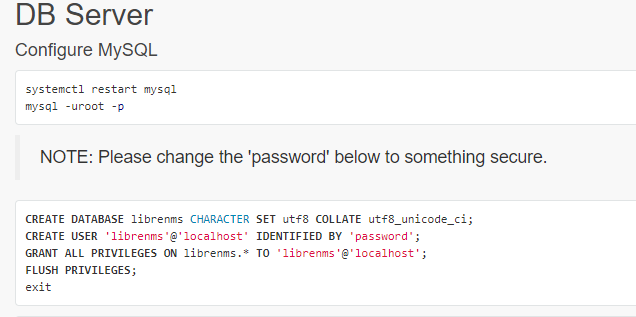
when you get to this section of the install doc are you setting a DB user and DB password?
image

if you are then use that as the login for MySQL

I tried to login as the user I created with the configuration, but it is not working either.

I was searching on the internet and this problem happened a lot, could this be a bug in mariadb or?

Weird I never seen it personally.

Do you have any suggestions that I can do right now?

No, other than what laf recommend doing removing MySQL completely and start back over. When you get the Database part of the install double check that you are setting the correct username and password.

I just thought of something when you try and login to the Database what are you typing in for the username?

I was able after reinstalling mysql a few times to configure the db server again. After I configured I used the command ./validate and got no errors, everything was ok.

When I went to the webui, I wanted to login with the username and password what was set in the php file and the mariadb-server. But I get the error incorrect credentials, I’m pretty sure that I entered it correctly.

Any tips?

It feels like when I get out of 1 error I fall into a new one all the time, which is kinda sad :frowning:
Anyway thanks a lot for all your replies!

You dont set the web ui username and password inside of config.php

In the install doc, it walks you through making username and password for the web UI. But it looks like you didn’t do that or missed the step. Anyway you can add a user from cli https://docs.librenms.org/#Installation/Installation-Ubuntu-1404-Apache/#create-admin-user

Thank you!

I noticed that the create admin user wasn’t in the following guide which I used https://docs.librenms.org/#Installation/Installation-Ubuntu-1604-Apache/ .

It’s is working now, thanks a lot!

That’s because in the new guide when you get to the install part in the web ui it has you make the user account.

But you should be fine now.