This topic of CPU summary average (aggregated instead per core) has been circulating with different ways of solving, however I could not find any solution that worked for me, so I did invent something that worked. Even the example provided in the official documentation wasn’t working.
The problem with earlier solutions seems to be that if you try a SQL with AVG(processors.processor_usage) you have to either use a GROUP BY, or run it in a sub-query. The GROUP BY option conflicts with Laravel strict mode, while sub-query option produces an un-groupped column which again causes a conflict. These errors, if happening, are visible in Overview → Eventlog page of LibreNMS.
There might be some other workarounds (like configuring strict mode to allow loose GROUP BY), but the most straight forward looked to move GROUP BY function to another place. In the end I chose to create an SQL VIEW, and it worked. To do so login into your MariaDB and choose “librenms” DB. Then add the view:
CREATE VIEW avgcpu
AS SELECT devices.device_id, avg(processors.processor_usage) as avgcpu
FROM devices, processors
WHERE devices.device_id = processors.device_id
GROUP BY device_id;
Make sure you don’t add any other columns to the view, otherwise you may step on the same GROUP BY rake again.
Then run a commands in LibreNMS WEB instance:
# Create a macro
lnms config:set alert.macros.rule.cpu_used_avg_perc “(SELECT %avgcpu.avgcpu WHERE %avgcpu.device_id = %devices.device_id)”

# Clears the config cache and make previous step available
lnms config:clear
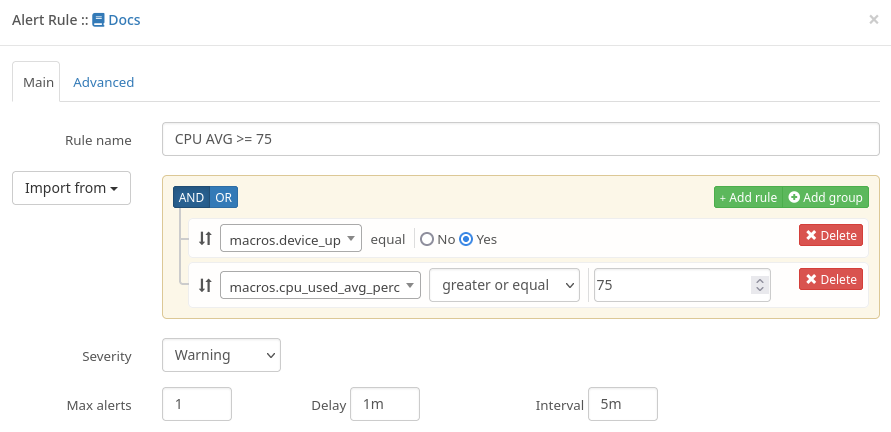
Now reload the Alerts page, and you can add a new alert using “macros.cpu_used_avg_perc” from the GUI:
Which will generate this kind of a SQL (just FYI, you don’t need do anything with it):
SELECT * FROM devices, avgcpu
WHERE (devices.device_id = ?)
AND (devices.status = 1 && (devices.disabled = 0 && devices.ignore = 0)) = 1
AND (SELECT avgcpu.avgcpu WHERE avgcpu.device_id = devices.device_id) >= 75
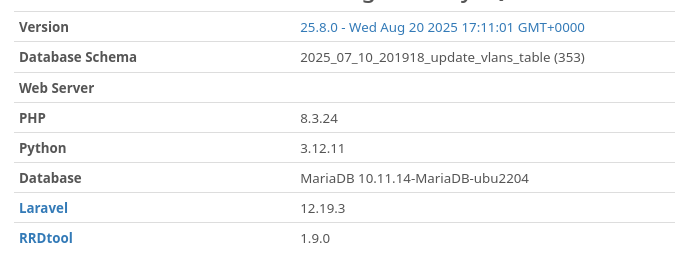
I saw there were complaints that some previous workarounds used to work before and then stopped. This one works with version: