[OK] Composer Version: 2.9.2
[OK] Dependencies up-to-date.
[OK] Database Connected
[OK] Database Schema is current
[OK] SQL Server meets minimum requirements
[OK] lower_case_table_names is enabled
[OK] MySQL engine is optimal
[OK] Database and column collations are correct
[OK] Database schema correct
[OK] MySQL and PHP time match
[OK] Active pollers found
[OK] Dispatcher Service not detected
[OK] Locks are functional
[OK] Python poller wrapper is polling
[OK] Redis is unavailable
[OK] rrd_dir is writable
[OK] rrdtool version ok
Our LibreNMS installation got stuck after the last nightly update.
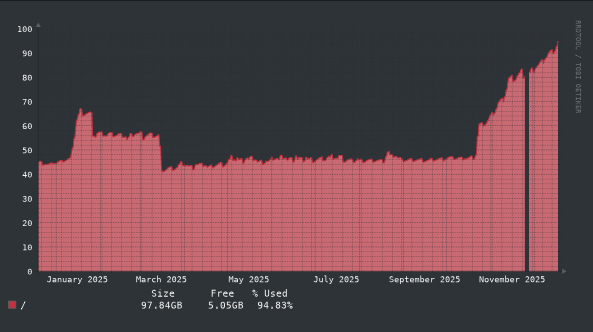
It figured out, that the space left of drive was completely used up for some reason.
The analysis shows, that the data-folder of the MySQL database seems to eat up almost all space:
From the amount of devices we currently monitor, I find 36GB a bit too large for my taste.
Also, I did not notice this problem before.
Did something change in code in November release that results in a huge increase of the database? Or could we have some misconfiguration here that leads to such problems?
I got a bit further… It seems that the daily cleanup of the Syslog-entries is broken for some reason. The entries do not get removed by the ./daily.sh script.
I just fired the command lnms maintenance:cleanup-syslog manually and it’s already running for ages. I will update this ticket when it’s finished.
EDIT: It just finished after nearly one hour runtime! Cleared syslog entries older than 7 days (33198601 rows)
Checking daily.sh I can not find any reference to the syslog-cleanup. Was it removed accidentally or was it never added?
And does anything speak against creating a PR containing the missing line for also cleaning syslog-entries by the daily job? If not, I’d do so.
Also, after running a mysqlcheck -o librenms the size on disk further went from now 21GB to 4.1GB! Should we also have a scheduled optimize in a cron-job? Or at least add some “best practice” notes so that the admins take care of this themselves?
I’m experiencing the same issue. It might be related to this change, moving the syslog cleanup from daily.sh into the lnms maintenance commands: Github Pull Request #18258
My issue is that I’m not sure if all of the maintenance commands seem to be running on my installation. The only entries I see in my maintenance.log file show the MAC OUI database updating. I have the daily.sh cronjob running normally, and I have the systemd librenms-scheduler service and timer also running normally.
My LibreNMS’ SQL database ballooned to almost 500 GB. We receive a lot of syslogs and were adding a lot of devices, so I didn’t notice until I checked the syslog database growing like you did. I tried the lnms maintenance:cleanup-syslog command but I suspect just due to the sheer size of the database it would take forever to complete, if it didn’t crash along the way. I had to drop the syslog table entirely and re-create it since the server itself was running out of disk space.
The command does seem to list the scheduled commands:
librenms@sv-librenms1:~$ php artisan schedule:list

  */5 * * * *  Closure at: routes/console.php:175 .......................................................................... Next Due: 4 minutes from now
  45  1 * * 0  php artisan maintenance:fetch-ouis .............................................................................. Next Due: 1 day from now
  19  2 * * 0  php artisan maintenance:cleanup-networks ........................................................................ Next Due: 1 day from now
  12  3 * * *  php artisan maintenance:fetch-rss ............................................................................. Next Due: 8 hours from now
  30  3 * * *  php artisan maintenance:cleanup-syslog ........................................................................ Next Due: 9 hours from now
The maintenance.log file for each day just looks like this:
librenms@sv-librenms1:~$ cat /opt/librenms/logs/maintenance.log.1
Waiting 7 minutes before attempting MAC OUI update
Storing Mac OUI in the database
  -> Downloading ...
  -> Processing CSV ...
  -> Saving results ...
Successfully updated. 50 modified OUIs
On this server I already dropped the syslog table and re-created the database from a Mariadb backup. When running the commands manually I get output from each one except for the cleanup-networks command, so it seems to be running okay.
librenms@sv-librenms1:~$ lnms maintenance:fetch-rss
[ Fri, 02 Jan 2026 18:25:30 -0500 ] LibreNMS https://www.librenms.org/notifications.rss (48)
[ Fri, 02 Jan 2026 18:25:30 -0500 ] local misc/notifications.rss (53)
[ Fri, 02 Jan 2026 18:25:30 -0500 ] Updating DB  Done
librenms@sv-librenms1:~$ lnms maintenance:cleanup-syslog
Cleared syslog entries older than 14 days (0 rows)
librenms@sv-librenms1:~$ lnms maintenance:cleanup-networks
librenms@sv-librenms1:~$ echo $?
0
I do have a database backup of the server before I restored from backup, so I don’t know if maybe it was a size issue. I will check on Monday if the maintenance logs show the commands running over the weekend.
Hey, so I checked and the scheduled commands don’t appear to be properly cleaning up syslogs on my installation. Here’s what I did:
I set syslog retention to 2 days.
I manually edited the time for maintenance:cleanup-syslog to the time I was running the command in /opt/librenms/routes/console.php.
I ran the artisan command in librenms-scheduler.service manually. The command completed immediately.
I checked the SQL database but the logs weren’t cleaned up.
I manually ran lnms maintenance:cleanup-syslog. It took a long time (we have a lot of logs) but it did clean up the syslog entries.
I restored the original /opt/librenms/routes/console.php file from git.
I’m not well-versed enough in PHP to see why the artisan command failed to clean up the syslogs but manually running the command maintenance:cleanup-syslog commands worked. CLI session output below.
# Set the syslog retention to 2 days to force logs to be removed
# Edited routes/console.php to set the maintenance:cleanup-syslog timer to now to force cleanup-syslog to run
librenms@sv-librenms1:~$ /usr/bin/env php artisan schedule:run --no-ansi --no-interaction

  2026-01-05 10:15:13 Running [Callback] .............................................................................................. 16.36ms DONE
  2026-01-05 10:15:13 Running ['artisan' maintenance:cleanup-syslog] .................................................................. 42.73ms DONE
  ⇂ commands.maintenance:cleanup-syslog.description
librenms@sv-librenms1:~$
logout
# Checking mysql to see if logs are deleted
root@sv-librenms1# mysql -u root
Welcome to the MariaDB monitor.  Commands end with ; or \g.
Your MariaDB connection id is 4913010
Server version: 10.11.13-MariaDB-0ubuntu0.24.04.1 Ubuntu 24.04

Copyright (c) 2000, 2018, Oracle, MariaDB Corporation Ab and others.

Type 'help;' or '\h' for help. Type '\c' to clear the current input statement.

MariaDB [(none)]> USE librenms;
Reading table information for completion of table and column names
You can turn off this feature to get a quicker startup with -A

Database changed
MariaDB [librenms]> select * from syslog limit 1;
+-----------+----------+----------+---------+------+---------------------+-------------------------+-------------------------------------------------------------------------------------------------------------------------------------------------------------------------------------------------------------------------------------------------------------------------------------------------------------+------------+
| device_id | facility | priority | level   | tag  | timestamp           | program                 | msg                                                                                                                                                                                                                                                                                                         | seq        |
+-----------+----------+----------+---------+------+---------------------+-------------------------+-------------------------------------------------------------------------------------------------------------------------------------------------------------------------------------------------------------------------------------------------------------------------------------------------------------+------------+
|         1 | authpriv | info     | info    | 56   | 2026-01-02 15:45:19 | CRON                    | pam_unix(cron:session): session closed for user librenms                                                                                                                                                                                                                                                    | 3320904440 |
+-----------+----------+----------+---------+------+---------------------+-------------------------+-------------------------------------------------------------------------------------------------------------------------------------------------------------------------------------------------------------------------------------------------------------------------------------------------------------+------------+
10 rows in set (0.021 sec)
# Logs were not cleared, logs are 3 days old
MariaDB [librenms]> quit;
Bye
root@sv-librenms1# su - librenms
# This command took an hour to complete - we have a lot of logs. Will probably switch to Graylog.
librenms@sv-librenms1:~$ lnms maintenance:cleanup-syslog
Cleared syslog entries older than 2 days (14641139 rows)
librenms@sv-librenms1:~$
logout
root@sv-librenms1# mysql -u root
Welcome to the MariaDB monitor.  Commands end with ; or \g.
Your MariaDB connection id is 5037622
Server version: 10.11.13-MariaDB-0ubuntu0.24.04.1 Ubuntu 24.04

Copyright (c) 2000, 2018, Oracle, MariaDB Corporation Ab and others.

Type 'help;' or '\h' for help. Type '\c' to clear the current input statement.

MariaDB [(none)]> USE librenms;
Reading table information for completion of table and column names
You can turn off this feature to get a quicker startup with -A

Database changed
MariaDB [librenms]> SELECT * from syslog limit 1;
+-----------+----------+----------+---------+------+---------------------+-------------------------+----------------------------------------------------------------------------------------------------------------------------------------------------------------------------------------------------+------------+
| device_id | facility | priority | level   | tag  | timestamp           | program                 | msg                                                                                                                                                                                                | seq        |
+-----------+----------+----------+---------+------+---------------------+-------------------------+----------------------------------------------------------------------------------------------------------------------------------------------------------------------------------------------------+------------+
|      1156 | local7   | debug    | debug   | bf   | 2026-01-03 11:25:56 | 271073465               | .Jan  3 11:25:39.978: sccp_send_capabilities_rsp_msg_v1: msg_cap->payload_caps = 261                                                                                                               | 3335531816 |
+-----------+----------+----------+---------+------+---------------------+-------------------------+----------------------------------------------------------------------------------------------------------------------------------------------------------------------------------------------------+------------+
10 rows in set (0.008 sec)

MariaDB [librenms]> quit;
Bye
librenms@sv-librenms1:~$ ./validate.php
===========================================
Component | Version
--------- | -------
LibreNMS  | 25.12.0 (2025-12-15T09:05:13-05:00)
DB Schema | 2025_12_05_205509_devices_add_mtu_status (362)
PHP       | 8.3.6
Python    | 3.12.3
Database  | MariaDB 10.11.13-MariaDB-0ubuntu0.24.04.1
RRDTool   | 1.7.2
SNMP      | 5.9.4.pre2
===========================================

[OK]    Composer Version: 2.9.3
[OK]    Dependencies up-to-date.
[OK]    Database Connected
[OK]    Database Schema is current
[OK]    SQL Server meets minimum requirements
[OK]    lower_case_table_names is enabled
[OK]    MySQL engine is optimal
[OK]    Database and column collations are correct
[OK]    Database schema correct
[OK]    MySQL and PHP time match
[OK]    Distributed Polling setting is enabled globally
[OK]    Connected to rrdcached
[OK]    Active pollers found
[OK]    Dispatcher Service not detected
[OK]    Locks are functional
[OK]    Python poller wrapper is polling
[OK]    Redis is functional
[OK]    rrdtool version ok
[OK]    Connected to rrdcached
  */5 * * * *  Closure at: routes/console.php:175 ........................................................................................................................................................................................................................................... Next Due: 3 minutes from now
  12  1 * * 0  php artisan maintenance:fetch-ouis .............................................................................................................................................................................................................................................. Next Due: 4 days from now
  43  2 * * 0  php artisan maintenance:cleanup-networks ........................................................................................................................................................................................................................................ Next Due: 4 days from now
  17  3 * * *  php artisan maintenance:fetch-rss ............................................................................................................................................................................................................................................. Next Due: 19 hours from now
  30  3 * * *  php artisan maintenance:cleanup-syslog ........................................................................................................................................................................................................................................ Next Due: 19 hours from now
I also created a cron-entry as interim solution until this is puzzled out. based on my findings, I added a MySQL optimize there:
And directly calling via ‘php artisan’ completes normally as well. I spent an hour or so chasing code, to no avail. I have no experience with PHP, sadly.
The issue is the scheduled task was trying to create a log at /maintenance.log instead of the correct location. Likely resulting in a permission denied error.