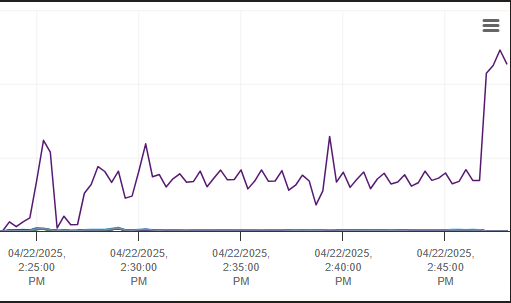
Initial Issue:
LibreNMS upgraded automatically, and I was on PHP 8.2.1, which broke my instance. I had to upgrade PHP manually and moved to (latest version) 8.4.6 using a guide from CyberBunny found here on the forums.
Current Issue:
Since the upgrade to 8.4.6, the CPU eventually maxes out (15-30 mins) and crashes the VM.
===========================================
| Component | Version |
|---|---|
| LibreNMS | 25.4.0-12-g234fa3277d (2025-04-17T01:21:54-05:00) |
| DB Schema | 2025_03_19_205700_fix_ospfv3_ports_table (331) |
| PHP | 8.4.6 |
| Python | 3.10.12 |
| Database | MariaDB 10.6.21-MariaDB-0ubuntu0.22.04.2 |
| RRDTool | 1.7.2 |
| SNMP | 5.9.1 |
| =========================================== |
[OK] Composer Version: 2.8.8
[OK] Dependencies up-to-date.
[OK] Database Connected
[OK] Database Schema is current
[OK] SQL Server meets minimum requirements
[OK] lower_case_table_names is enabled
[OK] MySQL engine is optimal
[OK] Database and column collations are correct
[OK] Database schema correct
[OK] MySQL and PHP time match
[OK] Active pollers found
[OK] Dispatcher Service has been used, but not recently
[OK] Locks are functional
[OK] Python poller wrapper is polling
[OK] Redis is unavailable
[OK] rrdtool version ok
[OK] Connected to rrdcached
Information about our environment/other notes:
- We do not use the Dispatch Service, but instead use Cron for the pollers.
- We have 69 devices in our environment.
- Poller frequency is set to 60 seconds.
- This configuration in our environment used to work with half the CPUs (had 6 vCPUs and now, even at 12, it’s crashing).
- Python Poller is set to 6 instead of 16.
- ./daily.sh does not fix this and runs without issues.
- /settings/system/scheduledtasks is all set to “Legacy.”
- I have not investigated the performance documentation yet.(Performance - LibreNMS Docs)
As a side note, my friend who works at a different organization manually upgraded from 8.2.1 PHP to 8.3, and he is monitoring 587 devices and is utilizing 16 CPUs. Something is causing issues here and I’m not sure if its PHP or something entirely different.
Thanks,
Michael