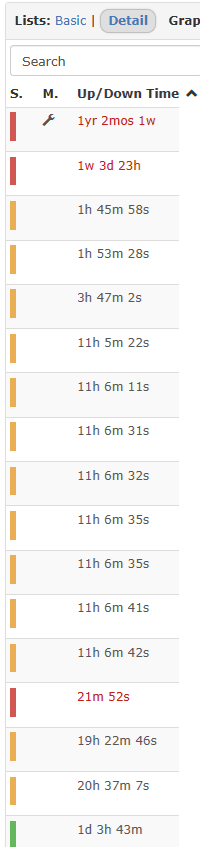
Hi, I am fully up to date on the latest librenms version. Recently I noticed that when devices are offline and I sort, the devices that are offline no longer appear at the top of the list. This seems to have broken within the last month or two, but the way that it worked, before, was that offline devices would appear in red at the top of the sort when I have the shortest uptime at the top sorting towards the longest uptime towards the bottom.
For example, right now I have a device that has been offline for 6minutes and it has 7 devices above. Those devices are ranging from 58 minutes up to 13 hours.
Not sure what happened with the sort, but it does appear to be recent. Has anyone else experienced this?
I can’t confirm as I only have 1 device offline at the moment, but when I posted this follow up 3 days ago it was not ordering properly.
Off hand I don’t know where the outages page is located, but I am always in the devices view and up until recently it was working fine I always saw the offline devices in red and would filter them to the top.
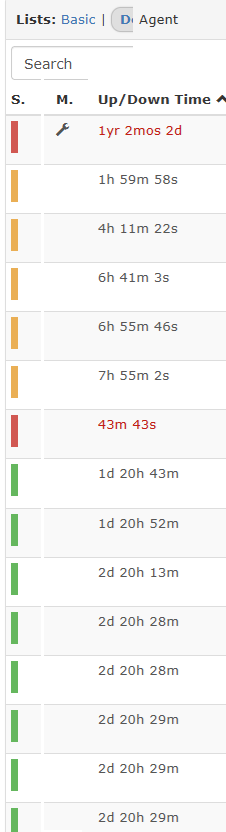
I was able to confirm, today, I have a site that is offline due to an ISP outage and when I arrange by up/down I see 1 offline device (has been offline for a while and I have it in maintenance mode) then I see 4 device online, two with 4 hours uptime and two with 9 hours uptime, then I see offline devices.
Edit- Also, I was able to find the outages page. To confirm, I’m look at this under All Devices which is where I’m at 99% of the time.
Here is a screenshot. The device that is offline for 43 min should be listed under the device that is offline for 1 yr 20 months…this is how it was as long as I can remember up until recently when it started looking like you see in the uploaded screenshot.
I don’t know that I would say that. It happened several times before I was able to grab the screenshot, but I was working on other things and when I got back to libre the devices were back online. I should be able to replicate an outage but I was also trying to let it happen on its own so it was more of an accurate representation of what happens.
However, I do have some spare cellular routers that I have on my bench and at a sites that are in place as a backup WAN link, I can disconnect power via a LAN PDU and see how things line up in libre.