Could you collect the output from this command
snmpwalk -v2c -c public 192.168.50.24 .1.3.6.1.4.1.8691.603
replace the community and ip for your EDS-G4014-6QGS-T
Could you collect the output from this command
snmpwalk -v2c -c public 192.168.50.24 .1.3.6.1.4.1.8691.603
replace the community and ip for your EDS-G4014-6QGS-T
and
snmpwalk -v2c -c public 192.168.50.24 .1.3.6.1.4.1.8691.608
@iamskol
please try this patch.
I added a couple POE and SFP stats.
.1.3.6.1.4.1.8691.603
.1.3.6.1.4.1.8691.608
Patch-Install-18702
rediscover the G4014 and let me know how it looks.
maybe it will have some poe/sfp data?
try the snmpwalk again but change it to
.1.3.6.1.4.1.8691.603.5.3
.1.3.6.1.4.1.8691.608.2
Just making sure , This G4014 is supplying POE power to devices?
If so, could you walk this please.
.1.3.6.1.4.1.8691.608.2.2
@iamskol
I added TurboRing/Chain/Dualhoming data and added SFP info to the name.
re-apply the patch and let me know how it looks.
I just need the snmpwalk from any device supplying POE power to devices to fill it in.
.1.3.6.1.4.1.8691.608.2.2
I’m going to get this done today. Sorry.. yesterday was not a good day. Things did not go to plan to put it lightly.
any update?
I’ve been fighting some SNMP timeouts that I’m trying to fix.
There was a big project due today that has been siphoning a lot of my time this week as well, but that has now been postponed (because of course).
I’m prioritizing this today. Thank you for being so patient.
@iamskol
I’m sorry but the output of this walk is showing none of the ports is using POE power.
the power output status of all 12 ports is false.
I don’t mean to beat this dead horse, but, could you perform the same walk on a device that is supplying POE to devices.
@iamskol
Have you applied the patch to your system?
Here you go… I actually included a switch with PoE this time. smdh.
@iamskol
you got to run the command like last time. With the OID at the end.
root@librenms:~# snmpwalk -v3 -u ########## -l authPriv -a SHA -A ############# -x AES -X ############### [ip address] .1.3.6.1.4.1.8691.608.2.2
I don’t know if it is possible for me to make this any more difficult than I have already … 
your doing a great job at it.
I need you help to confirm the metrics from that switch.
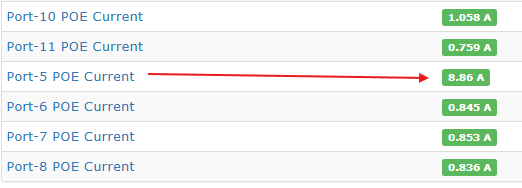
1: for POE Current - I assume the numbers are in milliamps so i divide it by 100.
ex: Port 8 = .1.3.6.1.4.1.8691.608.2.2.1.6.1.4.8 = STRING: “83.64” / 100 = .8364 mA
except for Port 5 = .5 = STRING: “886.01” /100 = 8.8 Amps ??
2: for POE budget and consumed power. What measurement are they in?

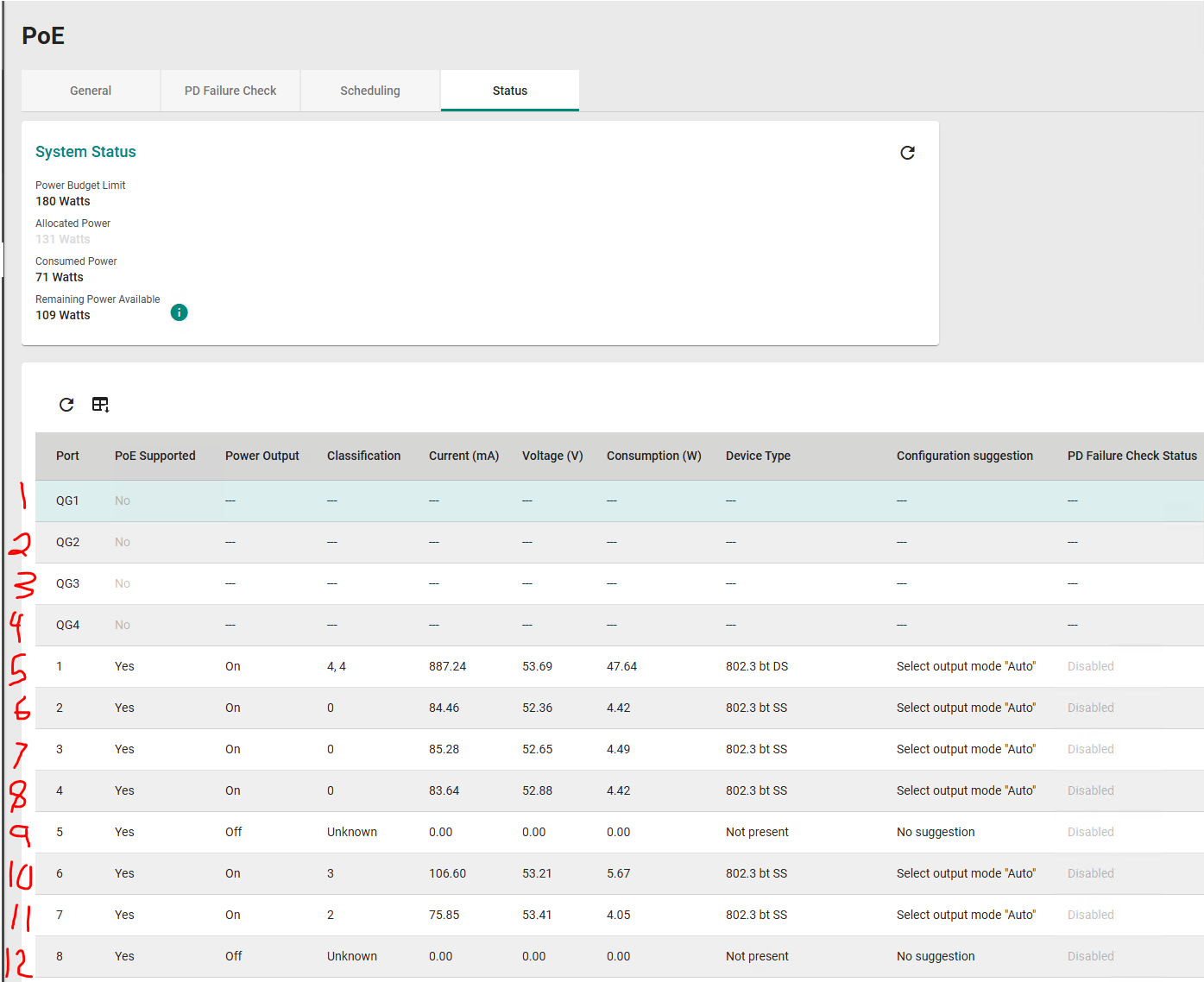
Here is the output from the switch GUI:
I am very much not a fan of how Moxa does its port labels.
QG1 = 1
QG2 = 2
QG3 = 3
QG4 = 4
1 = 5
2 = 6
3 = 7
4 = 8
5 = 9
6 = 10
7 = 11
8 = 12
That port in question is attached to a PTZ camera that draws a lot of power.
The Consumed Power and Budget are in Watts.
Can you provide a time range during each day when you’ll be most active doing this work? I’d like to make sure I provide updates in a timelier manner, and it seems you work overnights (I work 8-5ish CST).